> For the complete documentation index, see [llms.txt](https://help.smartrr.com/docs/llms.txt). Markdown versions of documentation pages are available by appending `.md` to page URLs; this page is available as [Markdown](https://help.smartrr.com/docs/support/subscription-setup/subscription-anchor-dates.md).

# Subscription anchor dates

Anchor dates are an optional add-on to Subscription Programs that set a day on which billing interval calculations should be made + schedule specific product ship dates.

{% hint style="info" %}
The most **common use-case** for anchor dates is when a shop wants to release subscription boxes on a specific day. For example, say a shop releases seasonal subscription drop:  ‘Autumn’ product on October 1st, etc. These dates are always fixed regardless of when the previous subscription product was delivered.&#x20;

Smartrr uses Shopify's anchor structure. Use Shopify's [**About selling plans**](https://shopify.dev/docs/apps/build/purchase-options/subscriptions/selling-plans#anchors) article as a guide to learn more about Shopify's anchors.
{% endhint %}

<figure><img src="https://3658670565-files.gitbook.io/~/files/v0/b/gitbook-x-prod.appspot.com/o/spaces%2FndNAuxS4koYyI8AQTpS9%2Fuploads%2FwvTZvqSWBiiohtLICdXE%2FScreenshot%202024-03-26%20at%2009.03.34.png?alt=media&amp;token=564fcad0-040a-430c-aa03-f4e7ec129338" alt="The anchor date setting on the selling plan card requires an Interval (week day - only available if selling plan&#x27;s interval is weekly, month day and year day), days of the week (if week day interval is selected), cutoff days and pre-anchor behavior."><figcaption></figcaption></figure>

### Adding an Anchor

When managing a [Subscription Program](/docs/support/subscription-setup/subscription-programs.md), you will see the **Anchor** tab on the selling plan cards:

<figure><img src="https://3658670565-files.gitbook.io/~/files/v0/b/gitbook-x-prod.appspot.com/o/spaces%2FndNAuxS4koYyI8AQTpS9%2Fuploads%2F2dTrZ3PH4Vq4WUJlNUCG%2Fimage.png?alt=media&amp;token=b49091e5-6816-4c15-9770-0c821307a82c" alt="Screenshot of the &#x22;Anchor&#x22; tab on the selling plan&#x27;s card."><figcaption></figcaption></figure>

Under this tab, you'll only see an **Interval** dropdown:&#x20;

<figure><img src="https://3658670565-files.gitbook.io/~/files/v0/b/gitbook-x-prod.appspot.com/o/spaces%2FndNAuxS4koYyI8AQTpS9%2Fuploads%2FticIbXs45cbv1OYcsAnp%2Fimage.png?alt=media&amp;token=5fcc58ec-4cb3-4626-b8f0-07d8067f598d" alt="Screenshot of the anchor&#x27;s interval dropdown."><figcaption></figcaption></figure>

The dropdown includes the options:

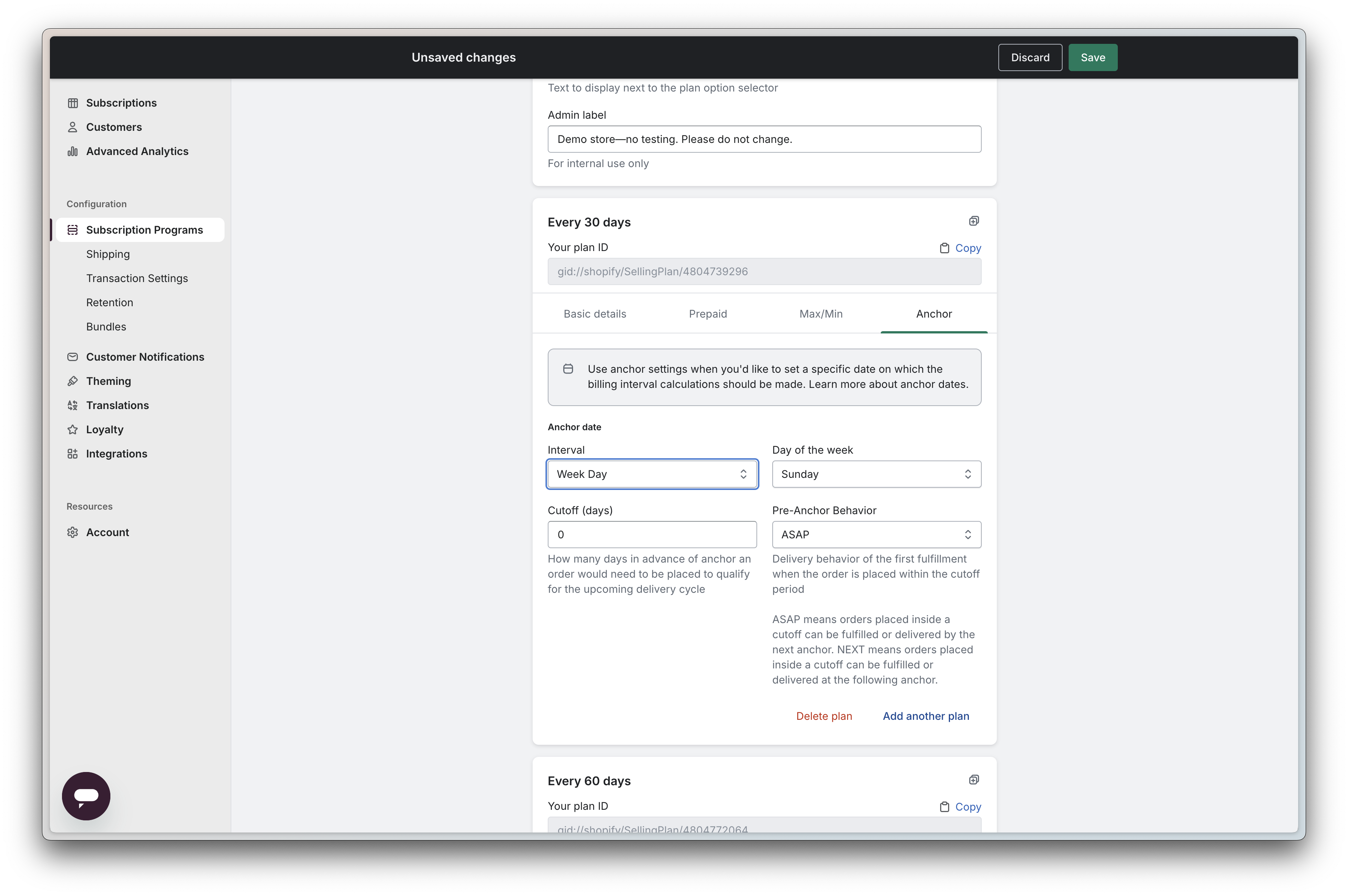
**Week Day** - When selected, this prompts the user to choose their "Day of the week" anchor (eg. Sunday, Monday, Tuesday, etc.), Cutoff (requires an integer for the number of cutoff days), and Pre-Anchor Behavior. The "Day of the week" field determines which day in the week should the subscription attempt its subsequent billings.

<figure><img src="https://3658670565-files.gitbook.io/~/files/v0/b/gitbook-x-prod.appspot.com/o/spaces%2FndNAuxS4koYyI8AQTpS9%2Fuploads%2FeRkuE8NJ5wQjfNMeHT1x%2Fimage.png?alt=media&amp;token=e019c345-3fdf-441b-9186-996ae675c832" alt="Screenshot of the &#x22;Week Day&#x22; anchor interval selected."><figcaption></figcaption></figure>

**Month Day** - This interval provides the same fields as the "Week Day", but the "Day of the week" field is replaced with "Day of the month". The "Day of the month" field requires the date of the month that the subscription should make a billing attempt (eg. every 1st of the month, or every 15th).

<figure><img src="https://3658670565-files.gitbook.io/~/files/v0/b/gitbook-x-prod.appspot.com/o/spaces%2FndNAuxS4koYyI8AQTpS9%2Fuploads%2F1PQiR1HrRlVtTWC4R7tl%2Fimage.png?alt=media&amp;token=ebae7db9-2a40-4dac-b201-d635923ff639" alt="Screenshot of the &#x22;Month Day&#x22; anchor interval selected."><figcaption></figcaption></figure>

**Year Day** - The Year Day interval can be used on selling plans with either a monthly or a yearly frequency. The pre-anchor behaviors work the same way in both cases. What changes is the outcome, because the next billing date depends on the selling plan's frequency and on when the subscription was purchased relative to the anchor dates. The example below uses a yearly frequency. For example, say you add these anchor dates:

* January 10th
* March 15th
* June 10th
* September 10th
* December 15th

If the subscription has a yearly frequency, its billing date locks to an anchor based on both the frequency and the purchase date. For example, a subscription purchased on January 12th is purchased after that month's January 10th anchor has already passed, so the next available anchor is January 10th of the following year, one full billing interval later.

With a cutoff of 0 and the **ASAP** pre-anchor behavior, the initial order is created with the "Unfulfilled" status and is ready for delivery, and the next billing date is January 10th of the following year.

With the **NEXT** pre-anchor behavior also with a cutoff of 0, the initial order is created with the "Scheduled" status for January 10th of the following year, and the next billing date is January 10th of the year after that.

[(see Pre-Anchor Behaviors below)](#pre-anchor-behaviors)

<figure><img src="https://3658670565-files.gitbook.io/~/files/v0/b/gitbook-x-prod.appspot.com/o/spaces%2FndNAuxS4koYyI8AQTpS9%2Fuploads%2FEOMDrN3JoA6OPC5XS7RE%2Fimage.png?alt=media&amp;token=bc7ad412-f10a-44e9-9bda-dac2b033b474" alt="Screenshot of the &#x22;Year Day&#x22; anchor interval selected."><figcaption></figcaption></figure>

{% hint style="info" %}
Note—the anchor tab will not be revealed if your selling plan's billing interval is set to "Days".
{% endhint %}

### **Cutoff Days**

A **cutoff day** is how many days in advance of the delivery anchor the order would need to be placed in order to qualify for the next delivery cycle.&#x20;

The cutoff day can help to prevent any instances of double billing. Double billing can happen in a situation where a customer on the 29th of March purchases a monthly subscription with the **ASAP** [pre-anchor behavior](#pre-anchor-behaviors) and a **Month Day** anchor date interval (set for the 1st of every month). In this scenario, the customer's next billing date will auto-set to the 1st of April, having them renewing their subscription way sooner than they'd expect. &#x20;

Following on the example above, with a cutoff of 7 days, the March 29th purchase falls within the cutoff window. The first order is created as Scheduled for April 1st instead of shipping immediately, and the next billing date moves to May 1st, which prevents the double billing.

### **Pre-Anchor Behaviors**

**Pre-Anchor Behavior** controls two things for a new subscription: when the first order (created at checkout) is fulfilled, and where the subscription's next billing date lands. On this page, the *upcoming anchor* is the first anchor date after the purchase, and the *following anchor* is the one after that. The pre-anchor behaviors are:

* **ASAP:** The first order is fulfilled immediately, and the next billing date is set to the upcoming anchor. If a cutoff is set and the purchase falls within it, the first order is instead scheduled for the upcoming anchor, and the next billing date moves to the following anchor.
* **NEXT:** The first order is scheduled for the upcoming anchor, and the next billing date is set to the following anchor. If a cutoff is set and the purchase falls within it, the upcoming anchor is skipped: the first order is scheduled for the following anchor, and the next billing date is set to the anchor after that.

**Purchases made on an anchor date** without cutoff days, behave the same under both settings: the first order is fulfilled immediately, and the next billing date is set to the following anchor.

**Examples:** [from Shopify's dev doc on Anchors](https://shopify.dev/docs/apps/build/purchase-options/subscriptions/selling-plans#anchors)

The following table shows some example scenarios of what the expected next billing and delivery dates are for a subscription with billing and delivery anchor dates at the 15th of each month (using the "month day" interval and the "day of the month" set at 15), given different first billing dates (when a subscription starts), `cutoff`, and `preAnchorBehavior` values:

<table><thead><tr><th>First billing date</th><th data-type="number">cutoff</th><th>preAnchorBehavior</th><th>First delivery date</th><th>Next billing and delivery date</th></tr></thead><tbody><tr><td rowspan="2">On the anchor date: 2023-01-15</td><td rowspan="2">0</td><td>ASAP</td><td>2023-01-15</td><td>2023-02-15</td></tr><tr><td>NEXT</td><td>2023-01-15</td><td>2023-02-15</td></tr><tr><td rowspan="2">Before the anchor date, and before the cutoff period: 2023-01-12</td><td rowspan="2">0</td><td>ASAP</td><td>2023-01-12</td><td>2023-01-15</td></tr><tr><td>NEXT</td><td>2023-01-15</td><td>2023-02-15</td></tr><tr><td rowspan="2">Before the anchor date, and within the cutoff period: 2023-01-12</td><td rowspan="2">5</td><td>ASAP</td><td>2023-01-15</td><td>2023-02-15</td></tr><tr><td>NEXT</td><td>2023-02-15</td><td>2023-03-15</td></tr></tbody></table>

The selling plan frequency being used in the above examples is a "Monthly" frequency.

Keeping the frequency in mind, for each scenario, the expected results/behaviors are:

* **On the anchor date: 2023-01-15**&#x20;
  * If the pre-anchor behavior is **ASAP**, the first order created through checkout is now in Shopify with the "Unfulfilled" status and is ready for delivery. The subscription's next billing date is set to 2023-02-15 (the next available anchor date).&#x20;
  * If the **NEXT** pre-anchor behavior is used, the expected outcome is that the first order created through checkout would still be assigned the "Unfulfilled"  status, making it ready for immediate delivery. And the subscription's next billing date remains 2023-02-15. Given this scenario, the outcome for both pre-anchor behaviors would return the same result.
* **Before the anchor date, and before the cutoff period: 2023-01-12**
  * If the pre-anchor behavior is **ASAP**, the first order created through checkout is now in Shopify with the "Unfulfilled" status and is ready for delivery. The subscription's next billing date is set to the immediate available anchor date which is 2023-01-15 (3 days later), which could lead to a double billing (fixable by setting up cutoff days on the selling plan).&#x20;
  * If the **NEXT** pre-anchor behavior is used, the expected outcome is that the first order created through checkout would be assigned the "Scheduled" status, with a delivery date set for 2023-01-15 (3 days after the purchase). And the subscription's next billing date is set to the next available anchor date, which is 2023-02-15.
* **Before the anchor date, and within the cutoff period: 2023-01-12 (5 cutoff days set on the selling plan)**
  * If the pre-anchor behavior is **ASAP**, and since it was created within the cutoff window, the first order created through checkout is now in Shopify with the "Scheduled" status with a delivery date set for 2023-01-15 (the immediate anchor date). The subscription's next billing date is set to the next available anchor date which is 2023-02-15. This scenario prevents the double billing noted above.&#x20;
  * If the **NEXT** pre-anchor behavior is used, the expected outcome is that the first order created through checkout would be assigned the "Scheduled" status, with the delivery date set for the next available anchor date 2023-02-15. And the subscription's next billing date is set to the next available anchor date after the order's scheduled date, which is 2023-03-15.


---

# Agent Instructions
This documentation is published with GitBook. GitBook is the documentation platform designed so that both humans and AI agents can read, navigate, and reason over technical content effectively. Learn more at gitbook.com.

## Querying This Documentation
If you need additional information that is not directly available in this page, you can query the documentation by asking a question.

Perform an HTTP GET request on the following URL with the `ask` and `goal` query parameters:

```
GET https://help.smartrr.com/docs/support/subscription-setup/subscription-anchor-dates.md?ask=<question>&goal=<user_goal>
```

`ask` is the immediate question: it should be specific, self-contained, and written in natural language.
`goal` is what the user is ultimately trying to achieve, the reason they need the answer. Sharing it helps GitBook give you a better, more relevant answer. A goal is most helpful when it describes the outcome the user wants rather than restating the question. For example, with `ask=how do I create an API token`, a goal like `automate deployments from our CI pipeline` lets GitBook tailor the answer to that use case.

The response will contain a direct answer to the question and relevant excerpts and sources from the documentation.

Use this mechanism when the answer is not explicitly present in the current page, you need clarification or additional context, or you want to retrieve related documentation sections.
