> For the complete documentation index, see [llms.txt](https://help.smartrr.com/docs/llms.txt). Markdown versions of documentation pages are available by appending `.md` to page URLs; this page is available as [Markdown](https://help.smartrr.com/docs/support/subscription-setup/selling-plans.md).
# Selling Plans
Selling plans define how customers can purchase products on a recurring or prepaid basis. They allow customers to subscribe, schedule repeat deliveries, or pay upfront for a specific period.
## What Is a Selling Plan?
A **selling plan** is a set of rules that describes the terms of a recurring purchase option. Each selling plan controls:
* **Billing frequency** (e.g., every 2 weeks, monthly, yearly)
* **Delivery frequency** (optional if different from billing)
* **Discounts and pricing** (e.g., 10% off, first-order discount, prepaid price)
* **Commitment rules** (e.g., minimum number of orders, prepaid durations)
Every selling plan has a unique **selling plan ID** that Shopify uses at checkout to apply the correct pricing and schedule.
## Selling Plan Groups / Subscription Programs
Selling plans are grouped into **selling plan groups**.\
A group represents a purchase option (e.g., “Subscribe & Save 10%”), while the plans inside the group represent the available frequencies.
#### **Example**
**Selling Plan Group:** Subscribe & Save
* Every week
* Every 2 weeks
* Every 4 weeks
This is **one group** with **three selling plans** inside it.
## How to Create Selling Plans
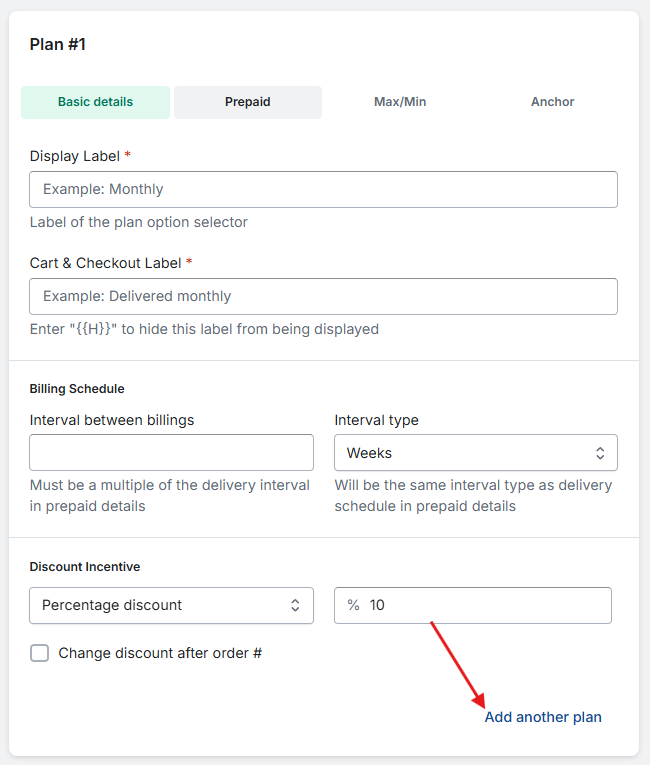
Selling plans live inside [Subscription Programs](/docs/support/subscription-setup/subscription-programs.md). When creating a **Subscription Program**, you will need to create at least 1 selling plan to save your new **Subscription Program**. You can add additional selling plans to that **Subscription Program** by clicking the "Add another plan" link, located at the bottom right corner of the default selling plan card:
## Selling Plan Fields
The required fields on the selling plan card are:
* Display Label
* Cart & Checkout Label
* Interval between billings
* Interval type
* Discount Incentive
#### **Display Label**
This is where you set the name of your selling plan/frequency. For example, "Monthly", "2 Months", "Annual", etc.
#### **Cart & Checkout Label**
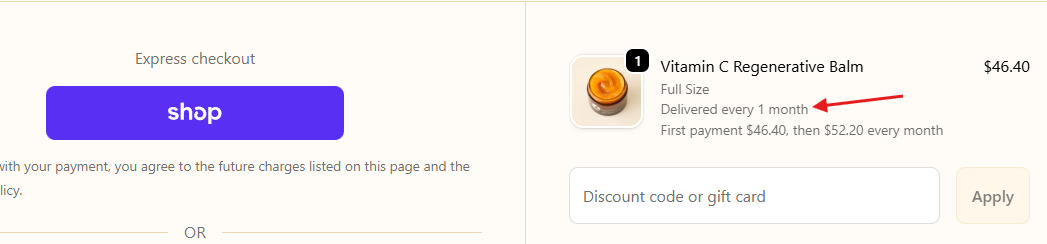
This is text that's displayed in the cart and at checkout in the product's line item properties:
Cart:
Checkout:
#### **Interval between billings**
This is where you set the number of days/weeks/months/year for your frequency (only whole numbers accepted):
#### Interval type
Here is where you set the frequency interval. Whether it's daily, monthly, weekly or yearly.
#### Discount Incentive
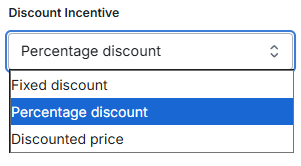
This section is where you set the incentive that's available for this selling plan. There are 3 types of incentives that are available in Smartrr:
* Fixed discount - Money/dollars off the subscription product's price
* Percentage discount - Percentage off the subscription product's price
* Discounted price - Set/special price for the subscription product (i.e. the price set here is the price the customer pays for their subscription)
The field next to the discount type is where you will set the value of your discount. This field does not accept decimal based integers:
If you don't wish to add an incentive for a selling plan, simply set the value of the incentive to zero '0'.
## Change discount after order \#
To apply a larger discount on the first subscription order and a smaller discount on future renewals, enable "Change discount after order #". You’ll find this option just below [**Discount Incentive**](#discount-incentive) on the selling plan card. Once checked, this is what you should see:
The setup is similar to the **Discount Incentive**'s. The difference is the immediate field where you will set the order that the discount changes. If the discount should change immediately after the 1st order, then the immediate field's value will stay as "1". Otherwise, update the value accordingly. Then setup the discount that should swap in after the 1st order.
{% hint style="info" %}
**Note:** The ability to change the discount after order # is only available on our [Grow and Excel plans](/docs/getting-started/onboarding/plans.md).
{% endhint %}
---
# Agent Instructions
This documentation is published with GitBook. GitBook is the documentation platform designed so that both humans and AI agents can read, navigate, and reason over technical content effectively. Learn more at gitbook.com.
## Querying This Documentation
If you need additional information that is not directly available in this page, you can query the documentation by asking a question.
Perform an HTTP GET request on the following URL with the `ask` and `goal` query parameters:
```
GET https://help.smartrr.com/docs/support/subscription-setup/selling-plans.md?ask=&goal=
```
`ask` is the immediate question: it should be specific, self-contained, and written in natural language.
`goal` is what the user is ultimately trying to achieve, the reason they need the answer. Sharing it helps GitBook give you a better, more relevant answer. A goal is most helpful when it describes the outcome the user wants rather than restating the question. For example, with `ask=how do I create an API token`, a goal like `automate deployments from our CI pipeline` lets GitBook tailor the answer to that use case.
The response will contain a direct answer to the question and relevant excerpts and sources from the documentation.
Use this mechanism when the answer is not explicitly present in the current page, you need clarification or additional context, or you want to retrieve related documentation sections.